Introduction to Data Abstraction
What transforms a scattered collection of facts into a powerful information system? This article traces the journey from raw data to managed databases, introduces the critical role of the DBMS, and reveals why the three-level architecture of database design has remained the foundation of every modern data system for over four decades.
From Facts to Systems: The Layered Abstraction of Data
Every information system begins with the same atomic unit: a fact. Whether it's a name, a temperature reading, or a pixel's color, a single fact that can be recorded is known as data.¹ ¹ The word "database" emerged in the 1960s as computer storage evolved from punch cards to magnetic tape and disk. Before this, collections of data were simply called "files" or "records." This data can take myriad forms—text, numbers, images, videos, and speech—but its role is constant: it is the fundamental raw material. When related pieces of this raw material are grouped together, they form a database, a structured collection. A database isn't defined by its size or technology, but by this relationship; a phonebook, a library catalog, and a server room full of hard drives all qualify as collections of related data.
The power of this abstraction becomes clear when we consider the diversity of collections. A traditional database focuses on text and numbers, like a trainee's name and marks. However, the same conceptual container can hold entirely different media. A multimedia database manages videos and songs, as seen on platforms like YouTube Music. A Geographic Information System (GIS) database is a collection primarily of images, such as satellite photographs used by organizations like NASA for spatial analysis.
This unifying concept of a "related collection" also extends to how the data is used. A real-time database is defined by its operational purpose: it tracks current state, like Paz Café inventory, to support immediate decisions. In contrast, a data warehouse is defined by its temporal scale and analytical purpose, storing massive volumes of historical data, like century-long stock market records, to uncover long-term trends.
In other words: the fundamental nature of a database is independent of its content or usage. Whether it stores text or video, whether it powers real-time decisions or century-scale analysis—a database is simply a structured collection of related facts. This unifying abstraction is what makes database theory universally applicable.
The Crucial Leap: From Static Collection to Dynamic System
A collection of data, by itself, is inert. The value lies in the ability to define its structure, populate it, and manipulate its contents—to ask questions and get answers. This is the role of the Database Management System (DBMS):² ² Popular DBMS examples include MySQL, PostgreSQL, Oracle, MongoDB, and SQLite. Each has different strengths—MySQL for web apps, PostgreSQL for complex queries, MongoDB for flexible documents. a set of programs that acts upon the database. The DBMS is the active component. It defines the data types and structures, constructs the database on physical storage, and provides the mechanisms for all manipulation, from adding a new record to running a complex query. It is the software that breathes life into the static data.
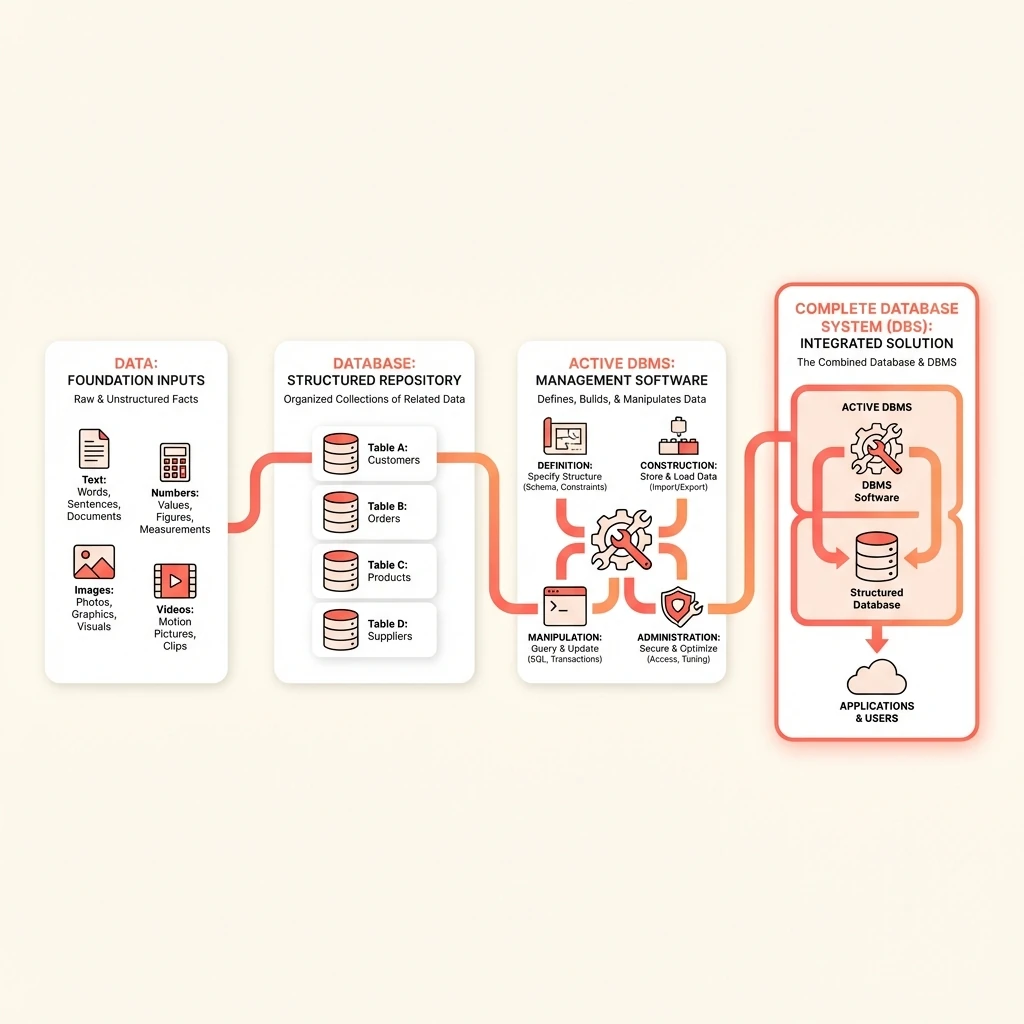
The combination of the passive database and the active management software forms a complete Database System (DBS). This distinction is critical. The DBS is the entire functional entity, analogous to a book (the database) and a pen (the DBMS) in a manual world. In that historical, manual system, the database was a physical book, and manipulation was done by hand with a pen. This analogy clarifies the separation of concerns: the data store versus the means of interacting with it.
Key Insight
The DBMS must be a dedicated software layer, distinct from the computer's operating system. Running the DBMS as a user-mode application preserves OS stability and security while delivering the speed required for practical data systems.
This separation leads to a key architectural insight: the DBMS must be a dedicated software layer, distinct from the computer's operating system. Why not simply embed database functionality directly into the OS? The answer lies in both stability and performance.
Embedding database logic into the OS would create a monolithic, bloated system that increases boot times for everyone—even users who don't need databases. More critically, every data operation would require expensive switches between user mode and the secure kernel mode, introducing significant overhead.
The solution is elegant: run the DBMS as a specialized user-mode application. The operating system provides foundational services like file storage and memory management. The DBMS sits on top, handling the complex logic of defining, constructing, and manipulating the database. This separation of concerns preserves OS stability while enabling the speed that data-intensive applications require.
The Three-Level Approach to Database Design
Creating a functional, efficient database is an exercise in engineering. Like constructing a building, it requires moving from a broad vision to specific, technical details. This process is structured around three distinct levels of modeling: conceptual, representational, and physical. Each level serves a unique purpose, ensuring clear communication between stakeholders and a precise technical blueprint for implementation. This staged approach separates the what of a database from the how of its logical organization and the where of its physical storage.
Conceptual Modeling: Capturing the "What"
The conceptual model is the highest and most abstract level of database design. Its primary goal is to capture and communicate the data requirements of a system in a way that is completely independent of any technical implementation. This model is created for and with stakeholders who understand the business or domain but not the intricacies of database systems.
At this level, terms like tables, records, or SQL are avoided. Instead, the focus is on the fundamental objects (entities) in the domain, their properties (attributes), and the meaningful connections between them (relationships). For instance, in Paz Academy's database, the core entities might be Trainee and Course, with an attribute like name, and a relationship like "enrolls in" linking them. This abstraction ensures that all parties agree on the system's purpose before a single line of code is written.
The Entity-Relationship Model
The most popular technique for creating a conceptual model is the Entity-Relationship (ER) model. It provides a standardized, visual language for diagramming the structure of information. By drawing boxes for entities, ovals for attributes, and diamonds for relationships, designers can create an intuitive map of the data landscape. This visual representation acts as a contract between stakeholders and developers, bridging the gap between user needs and the subsequent technical design phases. The ER model's power lies in its ability to make complex data requirements understandable without requiring technical expertise.
The Representational Model: Defining the Logical "How"
Once the conceptual "what" is agreed upon, the design process descends to the representational level. This stage is analogous to an engineer's technical blueprint; it is intended for database programmers and administrators who understand how data is queried and manipulated. Here, the abstract entities and relationships are translated into a concrete, logical structure.
This model is also called the implementation or relational model because it represents the database using relations—commonly known as tables. It defines the logical organization: what tables exist, what columns (attributes) each table has, and how rows (records) relate to one another through keys. For example, the Trainee entity becomes a `Trainees` table with columns for `trainee_id`, `name`, and so on. This model serves as the precise technical specification that guides the actual construction of the database within a Database Management System (DBMS).
The Physical Model: Mapping to the Machine
The final level, the physical model, deals with the raw mechanics of data storage. It answers questions about how the logical structures defined in the representational model are actually laid out on a physical storage device like a hard disk or SSD. This is the domain of database system engineers focused on performance and efficiency.
This model dictates low-level details: the exact byte structure of a record, the data types used, how records are sequenced in a file, and the mechanisms for accessing them. A table isn't stored as a picture; it's stored as a sequence of bytes. The physical model determines, for instance, how many bytes to skip to read the tenth record or how related records from different tables are colocated for faster retrieval. While hidden from most users, the choices at this level have a profound impact on the speed and scalability of the entire database system.
Key Insight
The three-level architecture (Conceptual → Representational → Physical) ensures that changes at one level don't cascade to others. A physical storage change doesn't break application logic at the external level.
Interactive Demonstration
🔄 Schema Level Toggler
Application sees a simple "Trainees" table:
✓ Simple query: SELECT * FROM Trainees
DBA sees the relational schema design:
✓ Defines constraints, keys, and relationships
Storage engineer sees byte-level layout:
✓ Can change storage (B-tree → Hash) without breaking External level
Conclusion
Understanding data abstraction is the foundation of all database work. In this article, we traced the journey from raw facts to managed database systems:
- Data — The atomic unit, a single recordable fact
- Database — A structured collection of related data
- DBMS — The active software layer that brings databases to life
- Three-Level Architecture — The separation of conceptual, representational, and physical concerns that makes databases maintainable across stakeholder boundaries
This layered approach isn't just academic theory—it's the reason why a storage engineer can swap out hard drives without alerting application developers, and why a business analyst can discuss requirements without learning SQL.
Looking ahead: With these foundations in place, we're ready to explore the Entity-Relationship model—the visual language used to capture business requirements at the conceptual level before any code is written.